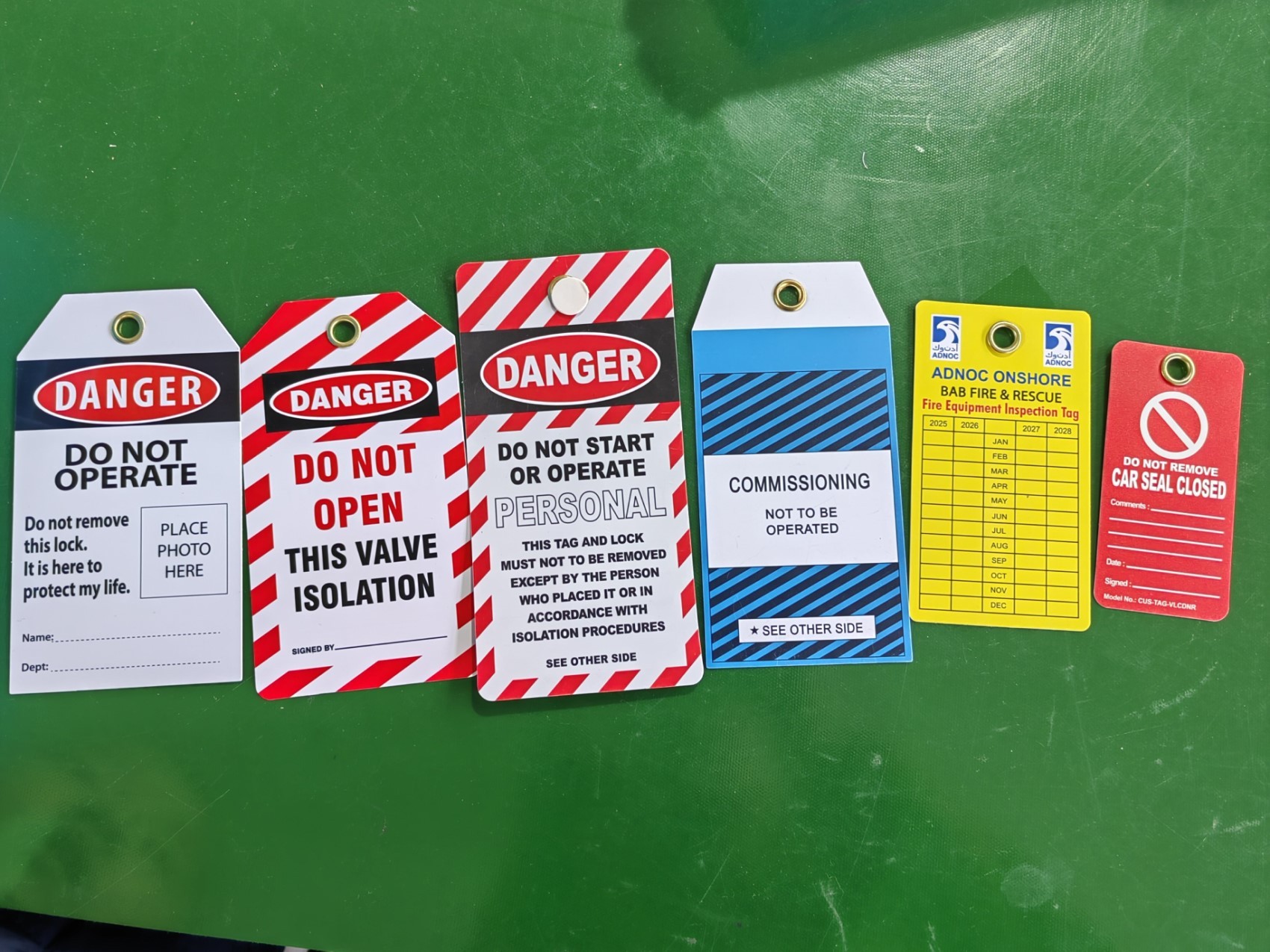
Machines don’t remember. People do—but under pressure, fatigue, or distraction, even seasoned technicians can misidentify isolation points or skip steps. That’s why generic lockout tagout (LOTO) tags fail where custom ones succeed. A universal “Do Not Operate” tag doesn’t tell a worker which valve was locked, who applied the lock, or what energy source was isolated. Custom lockout tagout tags fix that gap. They transform vague warnings into precise, actionable safety records—right on the machine.
OSHA’s lockout/tagout standard (29 CFR 1910.147) mandates that energy control procedures be “specific to the equipment.” Yet, many facilities still rely on one-size-fits-all tags. The result? Ambiguity, noncompliance, and near-misses. Custom LOTO tags close this compliance loophole by embedding critical details directly into the tag—before the lock is even applied.
This isn’t just about meeting regulations. It’s about creating a culture where safety is unambiguous, traceable, and human-error-resistant.
Why Generic Tags Fall Short in Real-World Use
A typical blank or pre-printed LOTO tag says:
“DO NOT OPERATE – LOCKED OUT”
That’s better than nothing, but in a high-risk environment, it’s dangerously incomplete.
Consider a maintenance team servicing a conveyor line with multiple motors, pneumatic lines, and electrical junctions. Three technicians apply locks. All use identical tags. No names. No dates. No isolation method. One tag accidentally falls off. Which lock belongs to the missing tag? Who applied it? Is the system truly de-energized?
Real incidents like this happen because generic tags lack context.
Common failures include: - Misidentification of isolators due to poor labeling - Incomplete energy source identification (e.g., ignoring hydraulic pressure) - Missing worker accountability (no name or ID) - Lost or damaged tags that can’t be traced - Inadequate language or symbols for multilingual teams
Custom lockout tagout tags eliminate these risks by design.
What Makes a LOTO Tag “Custom”?
A custom lockout tagout tag isn’t just branded with a company logo. True customization means tailoring the tag’s content, layout, and durability to a specific machine, procedure, or workforce need.
Key elements of a custom LOTO tag include:
Machine-Specific Details Pre-printed tags list the exact equipment (e.g., “Pump #4 – East Wing Cooling System”), eliminating guesswork during shutdown.
Pre-Filled Isolation Points Tags can list common energy sources (electrical, pneumatic, steam) with checkboxes, so workers confirm each one—not just assume.
Mandatory Fields Custom templates enforce data entry: name, ID number, shift, time, and department. This creates accountability and audit trails.
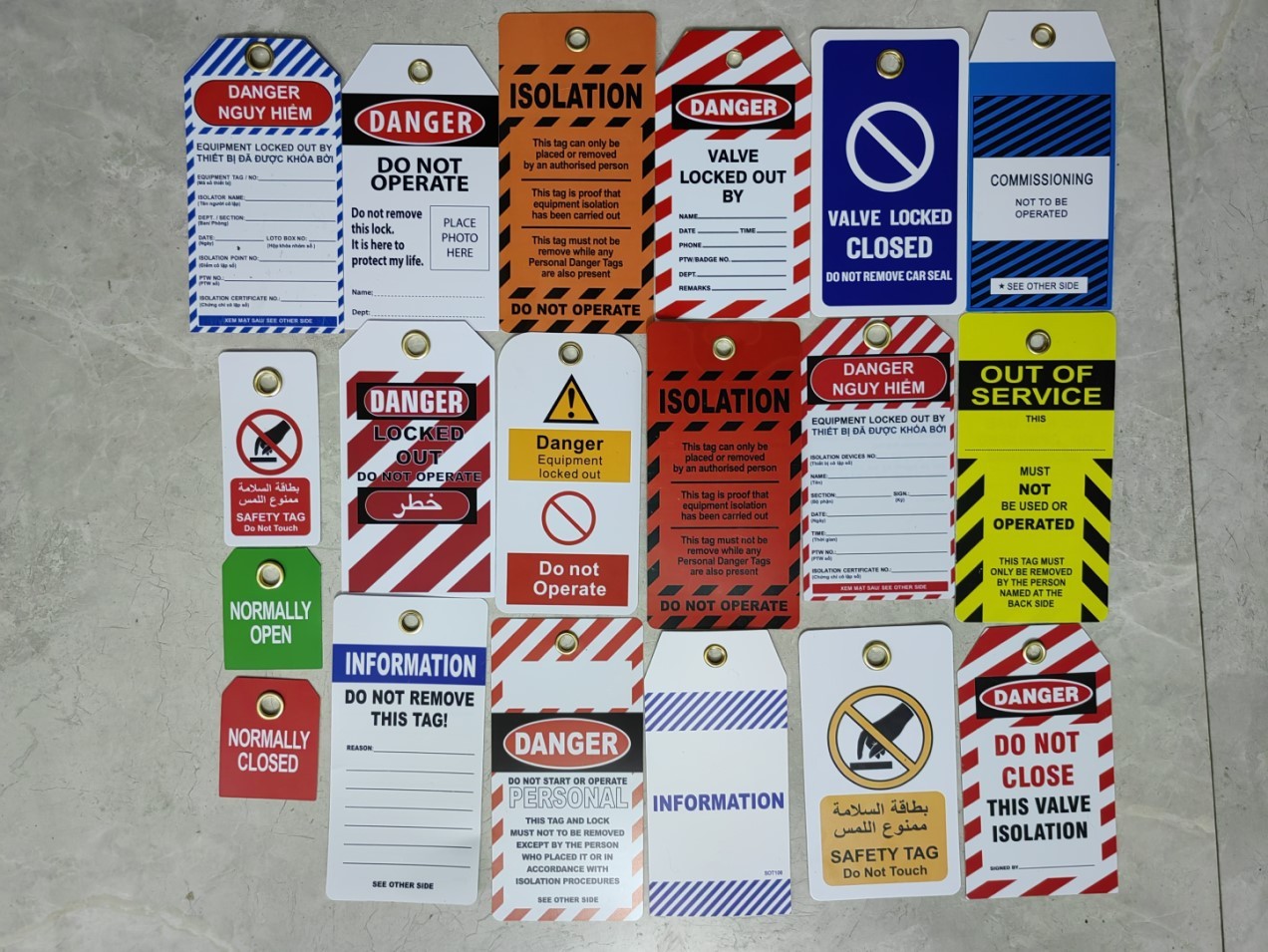
Multilingual Support For diverse teams, tags include safety warnings in multiple languages—Spanish, Vietnamese, Arabic—without cluttering the design.
Visual Enhancements Barcodes, QR codes, or color-coding by department or hazard type speed up verification and reduce errors.
Example: A food processing plant uses red tags for thermal systems, yellow for mechanical, and blue for electrical. Each includes a QR code linking to the full LOTO procedure. A new technician scans the tag and instantly sees a video walkthrough of the isolation steps.
How Custom Tags Strengthen Compliance and Reduce Risk
OSHA doesn’t require customization—but it does require that lockout procedures be effective, documented, and followed. Custom tags make compliance easier and more defensible.
Audit-Ready Documentation During an OSHA inspection, auditors look for evidence that procedures are followed consistently. Custom tags with filled fields provide immediate proof of compliance. Blank or missing fields on generic tags raise red flags.
Reduced Human Error A study by the National Institute for Occupational Safety and Health (NIOSH) found that 52% of LOTO-related incidents involved miscommunication or incomplete procedures. Custom tags reduce ambiguity, decreasing reliance on memory or verbal handoffs.
Faster Turnarounds Pre-filled tags cut setup time. Technicians don’t waste minutes filling out redundant info. For high-frequency maintenance tasks, this saves hours per month.
Integration
with Safety Management Systems
Many custom tags now include unique IDs or scannable codes that link to digital LOTO logs. Supervisors can verify lock status in real time, reducing unnecessary delays during shift changes.
Creating useful custom tags isn’t just about printing more text. It’s about designing for clarity, durability, and workflow integration.
Use a Standardized Template Create a master template for each major equipment type. Include: - Equipment ID - Required isolation methods (with checkboxes) - Worker fields (name, ID, date, time) - Emergency contact - Supervisor approval line
Pro Tip: Leave one blank line for “Other Energy Sources” to cover unexpected hazards.
Choose the Right Material Standard paper tags fail in wet, oily, or outdoor environments. Upgrade to: - Polyester (chemical and moisture resistant) - Vinyl (tear-proof, UV-stable) - Laminated cardstock (budget-friendly for indoor use)
Prioritize Visibility Use high-contrast colors: red/white, yellow/black. Include a bold border. Avoid small fonts—even under poor lighting, the tag must be readable at 18 inches.
Test for Real-World Use Print sample tags and run them through a mock LOTO drill. Can workers fill them out quickly? Are fields intuitive? Does the tag stay attached during vibration or cleaning?
One manufacturing client switched from flimsy paper tags to weather-resistant polyester with magnetic backs. Not only did tag retention improve by 90%, but technicians reported faster setup because the tag stayed in place during lock application.
Top 5 Custom LOTO Tag Providers (Compared) When sourcing custom tags, reliability and customization depth matter. Here are five reputable suppliers:
| Provider | Customization Level | Materials | Turnaround | Special Features |
|---|---|---|---|---|
| Brady | Full design control | Polyester, vinyl, metal | 3–5 days | Brady Workstation integration, barcode support |
| Grainger | Template-based | Vinyl, paper | 1–3 days | In-stock options, bulk pricing |
| Seton | Online designer tool | Polyester, Tyvek | 4–7 days | Multilingual templates, OSHA-compliant designs |
| Camcode | Enterprise-level | Durable synthetic | 5–10 days | QR code integration, asset tracking |
| Zoro | Basic customization | Paper, vinyl | 2–4 days | Low-cost, fast shipping |
Best for small teams: Grainger or Zoro for quick, affordable runs. Best for full integration: Brady or Camcode for digital-ready, auditable systems.
Common Mistakes to Avoid
Even with custom tags, poor implementation undermines safety.

- Overloading the tag – Too much text causes information blindness. Keep it essential.
- Skipping training – Workers must understand why each field matters. A tag without education is just paperwork.
- Using permanent details – Avoid printing names or phone numbers that change. Use fields instead.
- Ignoring replacement strategy – Tags wear out. Maintain a supply of blanks or reorder kits for damaged tags.
- Failing to update – When equipment changes, so should the tag. Review custom tags annually.
Real-World Use Case: Chemical Plant Reduces LOTO Errors by 76%
A Midwest chemical facility struggled with inconsistent lockout practices. Despite training, 30% of audits found missing or incorrect tags.
They introduced custom LOTO tags with: - Pre-printed equipment IDs - Checkboxes for 5 energy types - Mandatory name, shift, and time fields - UV-resistant polyester material
Within six months: - Tag completion rose from 68% to 98% - LOTO-related near-misses dropped by 76% - Maintenance delays due to verification issues fell by half
The plant safety manager noted: “The tags didn’t just improve compliance—they changed the mindset. Workers treat them like a safety contract, not a formality.”
Custom Tags Are Part of a Larger Safety System
Custom lockout tagout tags aren’t a standalone fix. They work best within a complete energy control program that includes: - Written LOTO procedures - Regular training and re-certification - Periodic audits - Lockout device management (hasps, lockboxes, group locks)
But within that system, custom tags serve as the frontline communication tool—visible, specific, and impossible to ignore.
They turn a regulatory requirement into a practical safeguard. And in high-risk environments, that difference can be life-or-death.
Act Now: Upgrade Your LOTO Tags Before the Next Incident
Don’t wait for an audit or accident to act. Review your current lockout tags. Are they generic? Frequently incomplete? Difficult to read?
Start by selecting three critical machines and designing custom tags for them. Test the process. Train the team. Measure the impact.
Then scale. Replace every generic tag with one that’s specific, durable, and designed to prevent error.
Safety isn’t about doing the minimum. It’s about making the right action the easiest one. Custom lockout tagout tags do exactly that.
FAQ
What information should be on a custom lockout tagout tag? At minimum: equipment ID, worker name and ID, date/time applied, energy sources isolated, and supervisor contact. Optional: QR codes, checkboxes, multilingual text.
Can custom LOTO tags be reused? No. Tags are single-use. Reusing a tag creates confusion and violates OSHA’s intent. Replace with a new tag each time.
Are custom tags OSHA-compliant? OSHA doesn’t require customization, but custom tags help meet the standard’s requirements for specificity, identification, and worker communication.
How durable should custom LOTO tags be? They must withstand the environment—oil, moisture, heat, UV exposure. Polyester or laminated vinyl is recommended for industrial settings.
Can we include barcodes or QR codes on custom tags? Yes, and it’s encouraged. Scannable codes link to digital procedures, training records, or isolation checklists.
Do custom tags cost significantly more than generic ones? Slightly—usually $0.25–$0.75 per tag vs. $0.10–$0.20. The ROI in reduced errors and faster compliance far outweighs the cost.
Who should fill out the custom tag? The authorized employee performing the servicing or maintenance. No one else should apply or remove the tag.
FAQ
What should you look for in Custom Lockout Tagout Tags: Precision Safety for Every Machine? Focus on relevance, practical value, and how well the solution matches real user intent.
Is Custom Lockout Tagout Tags: Precision Safety for Every Machine suitable for beginners? That depends on the workflow, but a clear step-by-step approach usually makes it easier to start.
How do you compare options around Custom Lockout Tagout Tags: Precision Safety for Every Machine? Compare features, trust signals, limitations, pricing, and ease of implementation.
What mistakes should you avoid? Avoid generic choices, weak validation, and decisions based only on marketing claims.
What is the next best step? Shortlist the most relevant options, validate them quickly, and refine from real-world results.